

dinsdag 11 maart 2008


dinsdag 4 maart 2008
5 ways to speed up your PC (windows)
Here are 5 ways to speed up your windows pc. I found this top 5 on the microsoft website.
1. free up disk space
By freeing disk space, you can improve the performance of your computer. The Disk Cleanup tool helps you free up space on your hard disk. The utility identifies files that you can safely delete, and then enables you to choose whether you want to delete some or all of the identified files.
2. speed up acces to data
Disk fragmentation slows the overall performance of your system. When files are fragmented, the computer must search the hard disk when the file is opened to piece it back together. The response time can be significantly longer.
Spyware collects personal information without letting you know and without asking for permission. From the Web sites you visit to usernames and passwords, spyware can put you and your confidential information at risk. In addition to privacy concerns, spyware can hamper your computer's performance. To combat spyware, you might want to consider using Microsoft Windows Defender, which is included in Windows Vista, and is available as a free download for Microsoft XP SP2. Alternatively, there are other free anti-spyware software programs available.
5. learn all about ReadyBoost
If you're using Windows Vista, you can use ReadyBoost to speed up your system. A new concept in adding memory to a system, it allows you to use non-volatile flash memory—like a USB flash drive or a memory card—to improve performance without having to add additional memory. Learn more.
1. free up disk space
By freeing disk space, you can improve the performance of your computer. The Disk Cleanup tool helps you free up space on your hard disk. The utility identifies files that you can safely delete, and then enables you to choose whether you want to delete some or all of the identified files.
2. speed up acces to data
Disk fragmentation slows the overall performance of your system. When files are fragmented, the computer must search the hard disk when the file is opened to piece it back together. The response time can be significantly longer.
Disk Defragmenter is a Windows utility that consolidates fragmented files and folders on your computer's hard disk so that each occupies a single space on the disk. With your files stored neatly end-to-end, without fragmentation, reading and writing to the disk speeds up.
3. Detect and repair disk errorsIn addition to running Disk Cleanup and Disk Defragmenter to optimize the performance of your computer, you can check the integrity of the files stored on your hard disk by running the Error Checking utility.
As you use your hard drive, it can develop bad sectors. Bad sectors slow down hard disk performance and sometimes make data writing (such as file saving) difficult, or even impossible. The Error Checking utility scans the hard drive for bad sectors, and scans for file system errors to see whether certain files or folders are misplaced.
If you use your computer daily, you should run this utility once a week to help prevent data loss.
4. protect your computer against spywareSpyware collects personal information without letting you know and without asking for permission. From the Web sites you visit to usernames and passwords, spyware can put you and your confidential information at risk. In addition to privacy concerns, spyware can hamper your computer's performance. To combat spyware, you might want to consider using Microsoft Windows Defender, which is included in Windows Vista, and is available as a free download for Microsoft XP SP2. Alternatively, there are other free anti-spyware software programs available.
5. learn all about ReadyBoost
If you're using Windows Vista, you can use ReadyBoost to speed up your system. A new concept in adding memory to a system, it allows you to use non-volatile flash memory—like a USB flash drive or a memory card—to improve performance without having to add additional memory. Learn more.
woensdag 27 februari 2008
Automatic login and locking the workstation on restart
At work we are running windwos server and when there is an important update, windows automaticly installs it and restarts the pc. That's a problem because we need some applications to run all the time.
I did a little search on te internet ( google is your friend) and came with the following result:
first I needed the make the pc login automaticly on restart. On the site of Microsoft I found I could fix this with a little change in the registery.
To do that u need to type the command regedit and to go to
HKEY_LOCAL_MACHINE\SOFTWARE\Microsoft\WindowsNT\CurrentVersion\Winlogon
There u have to change AutoAdminLogon to 1.
Now to make the workstation lock automaticly at startup I made a little Batchfile.
Open notepad and type the folowing text:
RUNDLL32.exe user32.dll, LockWorkStation
save it as a .bat file and put it into your startup programs.
The pc will now lock on startup.
I did a little search on te internet ( google is your friend) and came with the following result:
first I needed the make the pc login automaticly on restart. On the site of Microsoft I found I could fix this with a little change in the registery.
To do that u need to type the command regedit and to go to
HKEY_LOCAL_MACHINE\SOFTWARE\Microsoft\WindowsNT\CurrentVersion\Winlogon
There u have to change AutoAdminLogon to 1.
Now to make the workstation lock automaticly at startup I made a little Batchfile.
Open notepad and type the folowing text:
RUNDLL32.exe user32.dll, LockWorkStation
save it as a .bat file and put it into your startup programs.
The pc will now lock on startup.
woensdag 20 februari 2008
LPI registration
I've been busy lately, a lot of work and a lot planned in the weekends. ( went to the thermes of Spa, ...). A few days ago I decided to take the LPI exam and registered online. LPI stands for Linux professional institute.
I was looking for some kind of a study book and ordered LPIC I by Ross Brunson.
Then I looked a little further on the internet and came across a wikibook.
If some people are interested I made an PDF of it. U can find it here.
I was looking for some kind of a study book and ordered LPIC I by Ross Brunson.
Then I looked a little further on the internet and came across a wikibook.
If some people are interested I made an PDF of it. U can find it here.
zondag 3 februari 2008
How to put the trash icon and home icon on the desktop with Gnome
If u are using Ubuntu, the trash icon is located in the taskbar. Some people prefer to have that icon on the desktop. I'm going to show how to do it.
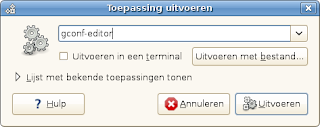
First press Alt + F2 and enter gconf-editor. this will show us the Gnome configuration editor.
Go to Apps --> nautilus --> desktop . On the right side select trash_icon_visible.
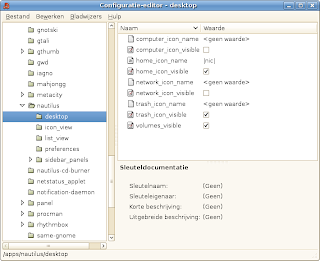
If u want to have the Home icon as well on your desktop, u can select it too ( Idem for computer and network icon) .
If u have any comments please post them.
First press Alt + F2 and enter gconf-editor. this will show us the Gnome configuration editor.

Go to Apps --> nautilus --> desktop . On the right side select trash_icon_visible.

If u want to have the Home icon as well on your desktop, u can select it too ( Idem for computer and network icon) .
If u have any comments please post them.
vrijdag 18 januari 2008
Installatie TinyMe ( PClinuxOS)
Ik heb gisteren de distributie TinyMe ( gebaseerd op PClinuxOS) geïnstalleerd op mijn pc. TinyMe is ontwikkeld voor oudere computers en gebruikt standaard openbox als windowmanager. Het is een snelle distro en het gebruik van synaptic is echt handig. Ik heb besloten om KDE ( 3.5.8 ) bij te installeren, waardoor ik nu een afgeslankte versie van PClinuxOS bekom. Alles werkte naar behoren uitgezonderd het geluid. Mijn oudere geluidskaart wordt bijna nooit van de eerste keer herkend.
Ik zal het nu nog wat verder uittesten naar stabiliteit en multimedia toe... Hier allesinds al een paar screenshots.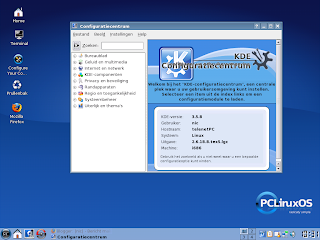
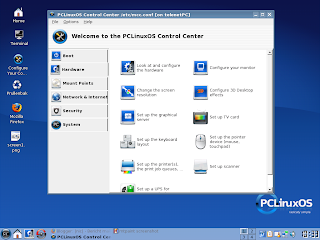
edit:
nieuwe screenshot na wat tweakig
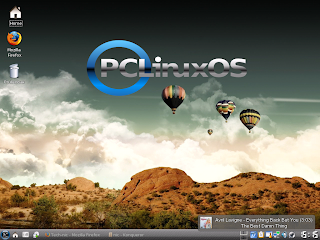
Ik zal het nu nog wat verder uittesten naar stabiliteit en multimedia toe... Hier allesinds al een paar screenshots.


edit:
nieuwe screenshot na wat tweakig

donderdag 17 januari 2008
Top 10: manieren om beter en slimmer te slapen.
Het is belangrijk een goede nachtrust te hebben ! Sommige studies tonen aan dat een slechte nachtrust de productiviteit verminderd. Hiervoor een top 10 voor je slaapt te verbeteren.
10. Verminder schermtijd voor het slapen gaan.
Stop met je mails te checken of tv te kijken voor je naar bed gaat. Een studie toont aan dat mensen die electrische media ( naar een scherm staren) gebruiken voor te gaan slapen , een minder kwaliteitsvolle slaap produceren.
9. Sport om je slaap te bevorderen.
Iedereen weet het, sport heeft een positieve invloed op je gezondheid. een goede nachtrust is er ook een van ! Zorg wel dat je 's morgens of in de namiddag aan sport doet om er beter van te kunne dromen.
8. Eet om je slaap te bevorderen.
Bepaalde voedsel leid tot een beter slaap, zoals bijvoorbeeld warme melk & kamomile thee.
7. Beheers de 'powernap"
Traag maar zeker worden de voordelen van de klassieke 20 minuten dutje herkend. Sommige grote bedrijven plaatsen "sleeppods" in hun kantoren. Er bestaat zelf software applicaties zoals Pzizz die voor het beste schema zorgen.
6. Vermijd de buzzende alramklok
Niemand houdt er van om wakker gemaakt te worden door het BEEP BEEP BEEP van de alarmklok. Kies dan beter voor een alarmklok met geïntegreerde radio.
5. Los problemen op in je slaap.
Zit je met een moeilijke beslissing of met een moeilijk op te lossen probleem? SOmmige studies tonen aan dat een korte rustperiode met gesloten ogen een oplossing kunnen leveren aan je probleem...
4. Versla insomnia met visualisatie
Als slaaploosheid 's nachts toeslaat en je voortdurend de minuten zit te tellen die voorbij gaan, met de gedachte dat je de volgende morgen als een zombie zal rondlopen. gebruik dan deze meditatie methode om je brein te laten rusten:
Here are the steps to relax your mind using Blue Energy:
Salvator Dali had een interessante techniek, door een lepel tussen duim en wijsvinger vast te houden viel de lepel bij het in slaap te vallen. door het geluid van de vallende lepen vermijd je een lange slaap.
2. Neem een caffeïne power nap.
Drink een kop koffie en neem erna een dutje van 15 minuten om je brein te rebooten en je opnieuw op te laden.
1. Leer jezelf je dromen te beheersen.
Om nachtmerries te vermijden moet je proberen je dromen te beheersen. hier kan je vinden hoe het moet : Teach yourself to lucid dream
Wat doet jij om in slaap te vallen, heb je je eigen techniek? laat het me weten in de comments!
10. Verminder schermtijd voor het slapen gaan.
Stop met je mails te checken of tv te kijken voor je naar bed gaat. Een studie toont aan dat mensen die electrische media ( naar een scherm staren) gebruiken voor te gaan slapen , een minder kwaliteitsvolle slaap produceren.
9. Sport om je slaap te bevorderen.
Iedereen weet het, sport heeft een positieve invloed op je gezondheid. een goede nachtrust is er ook een van ! Zorg wel dat je 's morgens of in de namiddag aan sport doet om er beter van te kunne dromen.
8. Eet om je slaap te bevorderen.
Bepaalde voedsel leid tot een beter slaap, zoals bijvoorbeeld warme melk & kamomile thee.
7. Beheers de 'powernap"
Traag maar zeker worden de voordelen van de klassieke 20 minuten dutje herkend. Sommige grote bedrijven plaatsen "sleeppods" in hun kantoren. Er bestaat zelf software applicaties zoals Pzizz die voor het beste schema zorgen.
6. Vermijd de buzzende alramklok
Niemand houdt er van om wakker gemaakt te worden door het BEEP BEEP BEEP van de alarmklok. Kies dan beter voor een alarmklok met geïntegreerde radio.
5. Los problemen op in je slaap.
Zit je met een moeilijke beslissing of met een moeilijk op te lossen probleem? SOmmige studies tonen aan dat een korte rustperiode met gesloten ogen een oplossing kunnen leveren aan je probleem...
4. Versla insomnia met visualisatie
Als slaaploosheid 's nachts toeslaat en je voortdurend de minuten zit te tellen die voorbij gaan, met de gedachte dat je de volgende morgen als een zombie zal rondlopen. gebruik dan deze meditatie methode om je brein te laten rusten:
Here are the steps to relax your mind using Blue Energy:
- Imagine your body filled with a blue gas, swarming all around, fillng up every part of you.
- Starting with your toes, to your feet and up your legs, slowly gather up all of this energy from each leg — feeling your toes, feet and legs relax as the energy leaves — and center it in your stomach area.
- Do the same for your arms — slowly pulling the blue energy from the finger tips, hands, arms, shoulder and down into your stomach, letting it join the rest, creating an even larger ball of blue energy.
- Again, pull the energy down from your head, neck and chest and add it to the spinning ball of blue energy that now fills your stomach area.
- This ball of blue energy now contains everything — all of your worries, stresses and fears — and with it all together, shoot it out of the top of your head, through the wall, outside, and straight up into the sky. Watch it shoot past the tree tops, through the clouds and into space.
- Feel your body relaxed and empty. Now, you're ready to sleep.
This simple exercise helps me relax my mind and body simultaneously, which allows me to fall asleep faster after a stressful day. Give it a try and leave your relaxation suggestions in the comments.
3. Verkort een lang dutje door de vallende lepel.Salvator Dali had een interessante techniek, door een lepel tussen duim en wijsvinger vast te houden viel de lepel bij het in slaap te vallen. door het geluid van de vallende lepen vermijd je een lange slaap.
2. Neem een caffeïne power nap.
Drink een kop koffie en neem erna een dutje van 15 minuten om je brein te rebooten en je opnieuw op te laden.
1. Leer jezelf je dromen te beheersen.
Om nachtmerries te vermijden moet je proberen je dromen te beheersen. hier kan je vinden hoe het moet : Teach yourself to lucid dream
Wat doet jij om in slaap te vallen, heb je je eigen techniek? laat het me weten in de comments!
Abonneren op:
Posts (Atom)
